
AI in Ecommerce: Use Cases + How to Drive Conversion
huhu.ai Team
Generative AI in ecommerce isn’t about novelty anymore; it’s about speed, scale, and measurable conversion lift. Founders, ecommerce leaders, and creative teams are using it to publish fresher PDP visuals, localize content faster, and test more ad iterations—without blowing up budgets or brand consistency.
The purpose of this guide is practical: a clear, role-ready playbook for the hero use case—product imagery generation and variant creation at scale—plus the secondary workflows that support it. You’ll find governance guardrails, marketplace requirements, measurement plans, and a vendor-neutral decision matrix you can put to work this quarter.
What generative AI in ecommerce is changing right now
Two shifts are forcing ecommerce teams to rethink content ops. First, discovery and purchase paths are being influenced by AI assistants and emerging “agentic” shopping workflows. Retail and platform leaders describe 2026 as a tipping point where catalogs, pricing, and checkout flows must be “agent-ready,” with secure transactions and standardized product data.
Second, asset velocity is now a competitive edge. Media pipelines that once needed days now take hours, enabling more frequent creative refreshes and PDP experimentation.
The implication is straightforward: brands that operationalize generative AI in retail and ecommerce will test more ideas, keep visuals aligned to season and segment, and invest in structured data that helps both humans and AI assistants make better decisions. That combination—faster iteration and better answers—tends to show up as higher CTR on ads, stronger PDP engagement, and ultimately higher CVR.
The hero playbook: product imagery generation and variants at scale
This section outlines a vendor-neutral blueprint to produce studio, lifestyle, and on‑model images (plus light motion) for every SKU—quickly, on brand, and in compliance.
Inputs & standards
Start with clear inputs and target outputs. Think of it like a recipe: consistent ingredients yield consistent results.
Product data: SKU IDs, attributes (colorways, materials), sizes. Exemplar assets: your current best-in-class studio and lifestyle shots to act as visual north stars. Brand style system: lighting, color profile, composition rules, framing, prop guidelines. Marketplace specs: Amazon’s main image rules (pure white background, product fills ≥85% of frame, high-resolution for zoom) are non-negotiable. eBay focuses on truthful, accurate representation and prohibits misleading edits or IP infringement. Asset plan per SKU: studio hero on white, front/angled views, on-model or in-context lifestyle, material/fit detail crops, and one short motion clip if applicable.
Why this matters: when prompts, references, and specs are standardized, model outputs become far more predictable. You’ll ship faster, and QA won’t drown.
Generation workflow (studio, lifestyle, on‑model, motion)
Here’s a pragmatic path that creative leads and content ops can run today:
1. Studio set generation — Use batch prompt templates for clean studio images. Establish lighting and shadow heuristics that match your brand. Keep the product geometry and color true; avoid over-smoothing textures.
2. Lifestyle/backdrop variants — Create scene libraries (e.g., sunlit loft, urban street, alpine trail). Vary seasonality and locale lightly to expand resonance without fragmenting brand identity.
3. On‑model try‑on — Maintain a small, consistent roster of virtual models that fit your target segments and size ranges. Standardize poses and camera angles so PDP grids look cohesive.
4. Recolors and angle coverage — Generate alternative colorways and missing angles for full PDP coverage. For footwear or hardgoods, ensure realistic reflections and shadow grounding.
5. Motion and 360°‑like clips — Convert a few hero images into five-to-ten-second motion loops for social and retail listings. Image-to-video makes this feasible without full productions.
A neutral micro-example: a typical batch might move from SKU upload to base studio set, then to on-model and lifestyle variants with QA checkpoints, before publishing to PDP and ads. Teams often use HuHu AI for this kind of visual pipeline—as it supports batch operations, on-model/try-on, and image-to-video within a unified workspace while preserving metadata tags for downstream systems.
QA & governance
Here’s the deal: nothing ships without consistent quality checks. Build a short, repeatable list your team can run on every batch.
Technical QC: resolution (≥1000 px on the long edge for marketplace zoom), edge artifacts, haloing, banding, color fidelity, shadow realism, label/logo integrity. Brand checks: composition and lighting aligned to style rules; consistent models; avoidance of off-brand props or settings. Marketplace compliance: confirm white-background main images for Amazon, image truthfulness per eBay’s policy, and consult Walmart Seller Center for category specifics if you sell there.
Disclosure and ethics: when AI images could be misread as real photos in ways that affect purchase decisions, add brief, proximate disclosure (e.g., “Some images are AI-generated”). The U.S. Federal Trade Commission’s 2024 final rule banning fake reviews and testimonials underscores that AI use never excuses deception; keep endorsements and UGC real.
Documentation: keep prompts, model parameters, and approvals in your DAM or version control so you can trace decisions.
Publish & integrate to PIM/DAM/CMS
Your imagery operation is only as strong as its handoff. Use metadata and automation to land assets where they drive revenue.
Tag assets with rich metadata: SKU, variant, view type (front, angled, on-model), locale, source (AI-generated), approval status. Route for approvals with lightweight SLAs. For high-stakes SKUs, add manual retouch checkpoints. Push to PDPs and marketplaces via API or low-code connectors. Teams often automate transforms (crops, compressions, background specs) on publish to reduce manual steps.
Measure & iterate (A/B testing & KPIs)
If you can’t measure it, you can’t prove it. Design tests that compare against your current best performing assets.
PDP tests: compare control (current imagery) vs. variant (AI-generated sets) on conversion rate, time on page, and bounce. Ensure clean traffic splits and adequate sample size. Creative tests: for ads/social, evaluate CTR and ROAS on assets derived from the same SKU set. Ops metrics: time-to-publish per SKU, cost per approved asset, rejection rates in QA.
Expected ranges vary by category and execution; public data remains directional. Use a conservative posture: run small pilots, watch out for trust and realism, and scale what works.

Secondary generative AI use cases in ecommerce
Generative AI isn’t a single trick. Here are the practical workflows most teams adopt next, once imagery is running smoothly.
Ad/social creative iteration
Extend winning patterns into new variants. Resize, reframe, test background changes, headlines, and CTAs rapidly. Use channel-fit templates to keep specs clean while changing one or two variables per test. Track CTR, CPC, and ROAS deltas before rolling out.
PDP content & localization
Draft titles, bullets, and SEO descriptions from structured product data; then localize copy across priority markets. Keep a human in the loop for category nuance and cultural fit. Roll changes out with A/B tests on product clusters so you can attribute gains to the copy changes rather than seasonality.
On‑site personalization
Swap hero visuals and copy blocks by segment or traffic source to reflect season, locale, or affinity. Start with obvious wins (e.g., colorways shown first by recent browsing) and escalate to model-driven personalization once you have guardrails.
How to implement generative AI in ecommerce (people, tools, budget)
Think pilot-to-scale: define roles, stand up a small but complete workflow, and expand in measured steps.
Roles & responsibilities
Founder/GM: goal setting, budget, risk appetite, governance standards. Head of Ecommerce/Performance: prioritization by category/channel, experimentation roadmap, KPI ownership. Creative/Brand Lead or Content Ops: style guide enforcement, prompt libraries, QA, and approvals. Engineering/MarTech: integrations to DAM/PIM/CMS, analytics pipelines, automation scripts.
Timelines & pilot plan
Weeks 1–2: gather inputs (exemplars, style guide, marketplace specs), choose 50–100 SKUs for pilot. Weeks 3–4: build prompt templates; generate base and lifestyle sets; set up QA and disclosures. Weeks 5–6: publish to PDPs in controlled A/B tests; run a handful of creative tests in paid social. Weeks 7–8: evaluate metrics; lock standards; plan scale-up and budget for the next quarter.
Tool decision matrix (choose what fits your stack)
Below is a simple matrix you can copy into your buying doc. Score each option from 1–5.
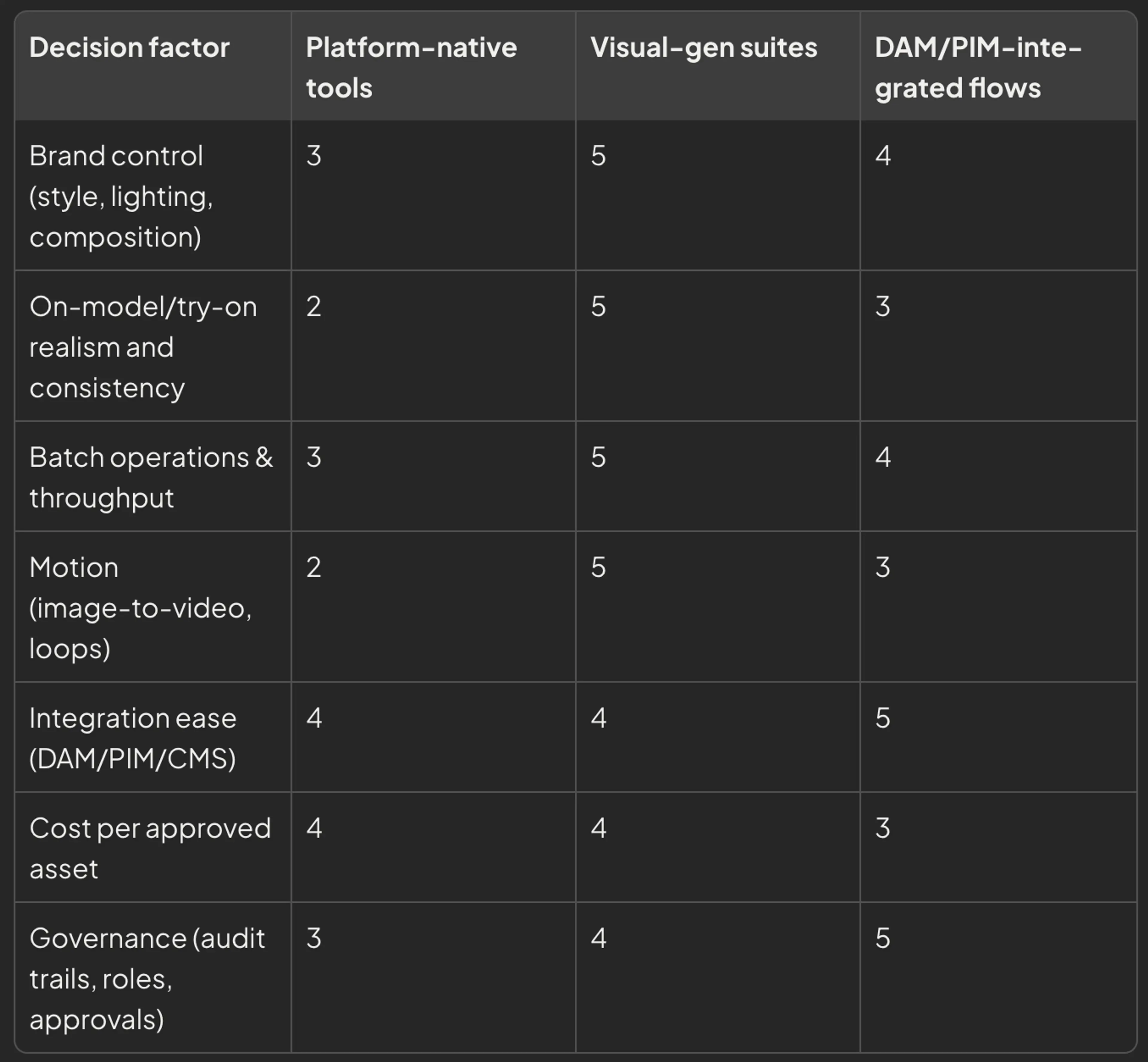
Use this as a starting point; your scoring will vary by ecosystem and team maturity.
Compliance, ethics, and risk controls
Compliance is part of the craft. A few non-negotiables:
Marketplace rules: Amazon’s main image requires a pure white background and accurate, high-resolution product depiction; confirm frame-fill and zoom specs in your Seller Central locale. eBay’s policy focuses on truthful, non-misleading images and IP integrity. If you sell on Walmart Marketplace, consult the internal Seller Center for category image standards.
FTC guardrails: The U.S. Federal Trade Commission’s 2024 final rule banning fake reviews and testimonials emphasizes that AI use never excuses deception. Keep endorsements authentic, and disclose clearly when a reasonable consumer could be misled.
Ethics: Avoid simulated “results” images that overstate product efficacy. Keep model representation authentic to your customers. Maintain audit trails for prompts, approvals, and changes.
GEO and the next wave of agentic shopping
As AI assistants summarize products and make recommendations, ecommerce teams need to optimize to be included accurately. Generative Engine Optimization (GEO) practices emphasize answer-oriented PDPs, structured data (Product, Review, FAQ schema), and clean entity and brand signals. Think of GEO as the SEO you run so machines “understand” your catalog as well as customers do.
FAQs
What does “generative AI in ecommerce” actually cover?
It refers to AI models that generate content—images, copy, video—used across PDPs, ads, emails, and on-site experiences. In practice, imagery generation and variant creation at scale is the most mature, operator-ready workflow.
Will AI images hurt trust or increase returns?
They can if realism is poor or context is misleading. Use on-model images that reflect true fit and materials, keep disclosures proximate when needed, and test against your current best assets. Measure returns rate alongside CVR and PDP engagement.
How do I start without breaking my brand?
Pilot with a small SKU set, lock a style system, and enforce QA. Introduce AI assets in less risky channels (e.g., remarketing, organic social) before swapping PDP main images.
How long before I see results?
Teams often see operational improvements (time-to-publish, cost per asset) within weeks. Conversion effects depend on category and execution; plan for 6–8 weeks to run clean tests and reach significance.
What tools should I use?
Pick based on brand control, realism, throughput, and integrations. Start with one suite that covers studio, lifestyle, on-model, and motion, plus a simple path into your DAM/CMS. Expand only when the pilot’s KPIs justify it.
Light wrap‑up
Generative AI in ecommerce pays off when you treat it like an operations upgrade, not a novelty. Standardize inputs, enforce QA, publish with rich metadata, and test relentlessly. Start small, prove lift, and scale what works.
Related Articles

AI-Generated Female Models Are Transforming Fashion E-Commerce
Learn about the advantages of using AI generated female models for efficient, customizable, and stunning fashion imagery.
Read More
Ultimate Guide to AI Human Model Generation for Ecommerce
Comprehensive guide to AI human model generation for ecommerce—precision controls, virtual try-on, pose and video workflows.
Read MoreAI Lookbook: Tech That’s Transforming Fashion Content Creation
Fashion brands, retailers, and creators are increasingly turning to AI lookbooks to streamline content creation, and visual storytelling while meeting the growing demand for engagi...
Read More